

Guide · 5-minute read
A budget that forecasts the rest of your year — what a rolling budget is
A rolling budget shows where your year will land, not just what you spent. How it works for a household, a worked example, and what to do with it.
Most budgets answer one question: what did we spend? It’s a useful question, but it only looks back.
Planners usually want to know something else: if the rest of the year goes as planned, where will we be in December? That is what a rolling budget answers.
A plan, a record, and a forecast
Think of a year’s budget in three layers.
- The plan. Before the year starts, you decide what each month should look like: income, bills, everyday spending, savings, debt payments. Twelve columns.
- The record. As each month happens, you record what really came in and went out.
- The forecast. Put the two together: the months that are done, as they really were, and the months still to come, as planned. Add them up and you can see where the year is heading.

A rolling budget is the third layer. It keeps moving as the year goes on — “rolling” forward a month at a time — so the end of the year is always in view.
A note on the word: in businesses, “rolling budget” often means a plan that always looks twelve months ahead. For a household, the calendar year is the natural unit — it’s how most people think about their money and their taxes — so here it means the current year: the months done, plus the months left.
Why it changes how you plan
A plan alone tells you what you hoped for. A record alone tells you what happened. Neither tells you whether the year still works.
A forecast does. If an unexpected expense in April pushes December’s end point down, you can see it in April — and you have eight months to adjust, rather than finding out at Christmas.
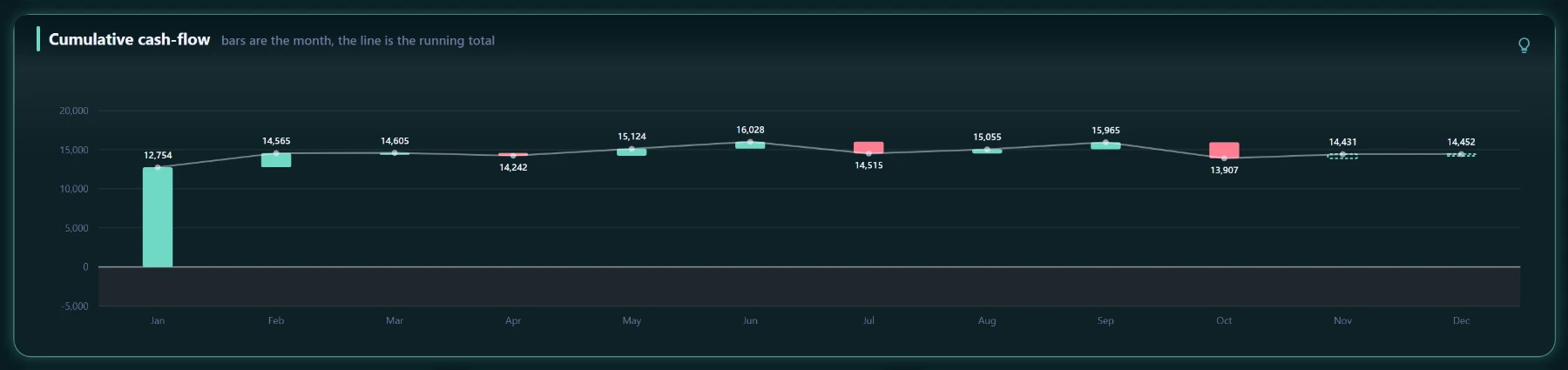
It also works the other way: a good spring might mean the summer trip can be a little bigger, or the extra can go to savings. Either way, you decide with the whole year in view.
A worked example: John and Mary
John and Mary are an example household. Every figure here is invented.
In January, John and Mary planned their year. If every month went exactly to plan, they would end December 9,600.00 better off than they started — that was the figure at the end of their plan’s cash-flow line.
It’s now early July. January to June are closed. Here’s what happened in those months compared with the plan:
| What happened, January to June | Effect on December |
|---|---|
| Groceries ran over, 50.00 a month on average | − 300.00 |
| An unplanned car repair in April | − 1,150.00 |
| Restaurants came in under | + 240.00 |
| Everything else as planned | 0.00 |
So the forecast for December now reads about 8,390.00 — still well in the positive, but 1,210.00 below what they planned.
Here’s what makes this useful. It’s July, not December. John and Mary sit down for twenty minutes and decide:
- Groceries: the plan of 800.00 was simply too low for them. They raise it to 850.00 for the rest of the year. Honest planning beats hopeful planning.
- The car repair: it was a one-off, but it tells them something. They add 50.00 a month from August to a car fund for next time.
- The trip in October: they keep it, but trim 300.00 from it.
After those changes, December reads 8,140.00. That’s a little lower again — 250.00 more is now going into the car fund — but it’s a figure built on what they actually know. No guessing, and no surprise in December.
How to keep a rolling budget yourself
You can do this in a spreadsheet, with some care:
- 1Plan all twelve months before the year begins, with bills in the months they’re really paid.
- 2Record what happens, and close each month at the end of it.
- 3Each month, replace the plan with the record for the month just closed, and keep the plan for the months ahead.
- 4Read the end of the year, not just this month.
- 5Adjust the months ahead while there’s still time.
The hard part in a spreadsheet is usually step 3, and anything to do with credit cards: card spending reaches your bank only when the card is paid, and getting that right by hand, month after month, takes effort.
Doing it in Quantum Budget
In Quantum Budget, the forecast is the Rolling Budget, part of the Pro plan.
- The months already done show what really happened; the months still to come show the plan; the current month is marked, so you can see where you are.
- It updates as you enter, on your computer or your phone. There’s no month-end copying.
- Cards and loans are handled for you: what you spend on a card reaches the cash-flow line when the card is paid, as it does in real life.
- Dashboard Pro shows where the year is heading and what moved the forecast.
- When the year ends, next year starts from this year’s budget, from this year’s actual figures, or from a clean page.
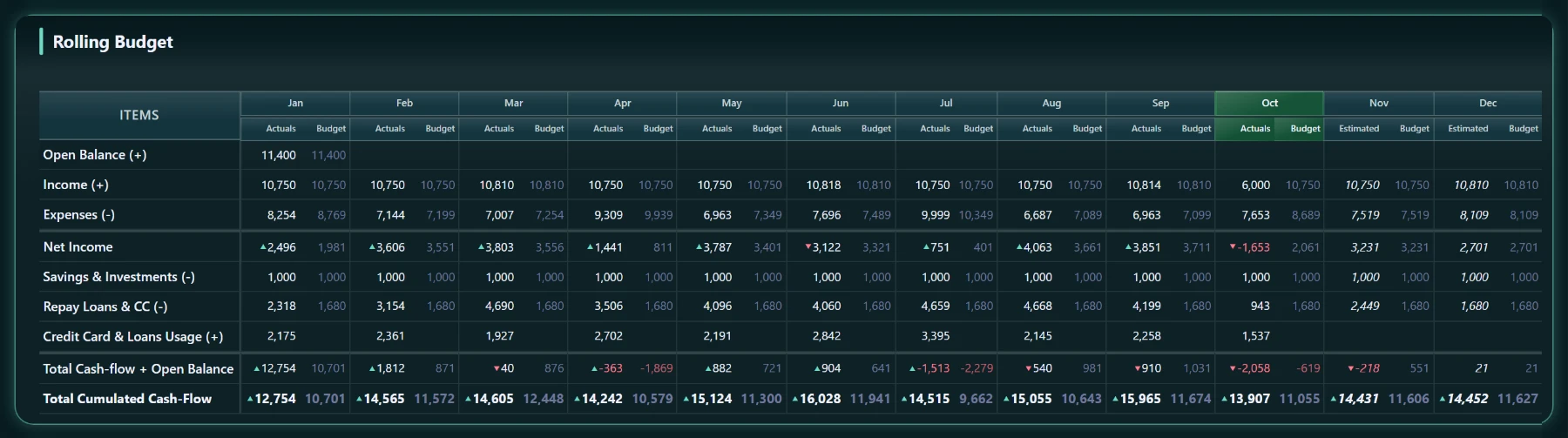
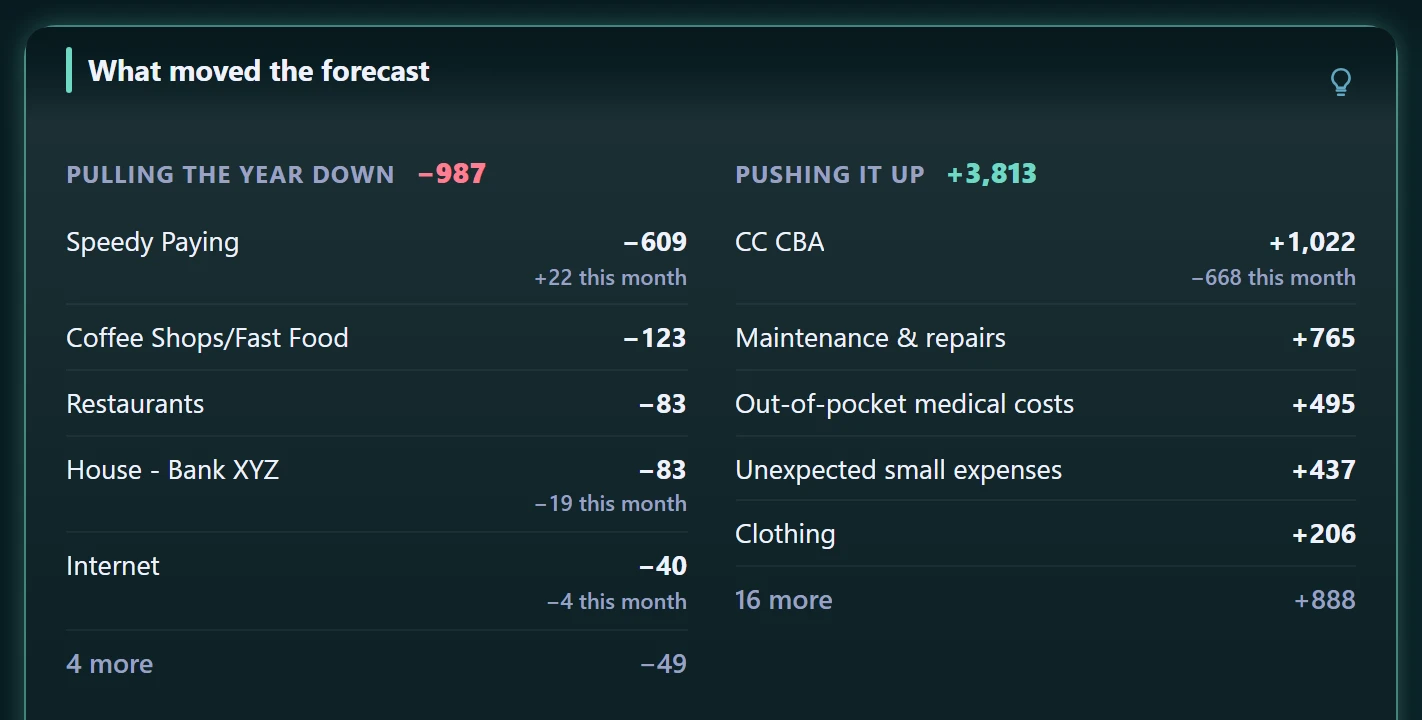
Light keeps the whole year’s plan and shows where you stand any day. Pro adds the months still to come. In one line: Light shows where you stand. Pro also shows where you are heading.
30 days free
Try it for 30 days
Light: US$4.99 a month or US$39 a year
Pro: US$8.99 a month or US$79.99 a year
30 days free on either plan. Your card is taken at the start and not charged for 30 days; cancel within them and you pay nothing.
See the plans and start 30 days free
Prefer to keep it in Excel? Quantum Budget Pro for Excel has a 12-month forecast too — a workbook you buy once, for Microsoft Excel on Windows.
Quantum Budget is budgeting software. It does not connect to a bank, does not hold or move money, and nothing in this article is financial advice.